I Shipped a Live AI Agent SaaS in 4 Weeks Using Azure Container Apps — Here's the Free, BYOK Architecture
How I built a free platform that spins up personal AI agents in under 2 minutes using Azure Container Apps and BYOK. Spin up, do your work, pause, resume — your context stays intact.
Four weeks. That's how long it took to go from idea to a live SaaS platform that spins up personal AI agents in under two minutes. Users pick a template, bring their own LLM key — OpenAI, Claude, or OpenRouter — and get a live agent with its own subdomain. No credit card, no billing complexity. Just containers that run when you need them and stop when you don't.
This post breaks down the architecture, the stack decisions, and why each piece exists.
Why I Built This
I kept running into the same problem: I'd need an AI agent for a specific task — competitive analysis on a company, reviewing a batch of PRs, writing a series of blog posts — and I had two options. Either use a generic ChatGPT session that forgets everything when I close the tab, or spin up my own infrastructure and spend hours configuring it.
What I actually wanted was simple: spin up an agent for a specific job, do the work, pause it, and come back later with all my context intact.
That's what OpenClaw does. Here's how I actually use it:
- Morning: I spin up a Research Assistant to do competitive analysis. I feed it URLs, PDFs, notes. It searches the web, reads papers, builds a structured summary. When I'm done, I pause the container.
- Afternoon: I fire up a Code Reviewer for my PR session. It flags bugs, suggests patterns, writes commit messages. Done for the day? Pause it.
- Next week: I resume the Research Assistant. All my previous research, conversation history, uploaded files — still there. I pick up exactly where I left off.
The mental model: one container per workflow, run it when you need it, pause when you don't. You can have five specialized agents for five different jobs, or one general-purpose agent with every skill loaded. It's fully customizable.
The 5 Templates
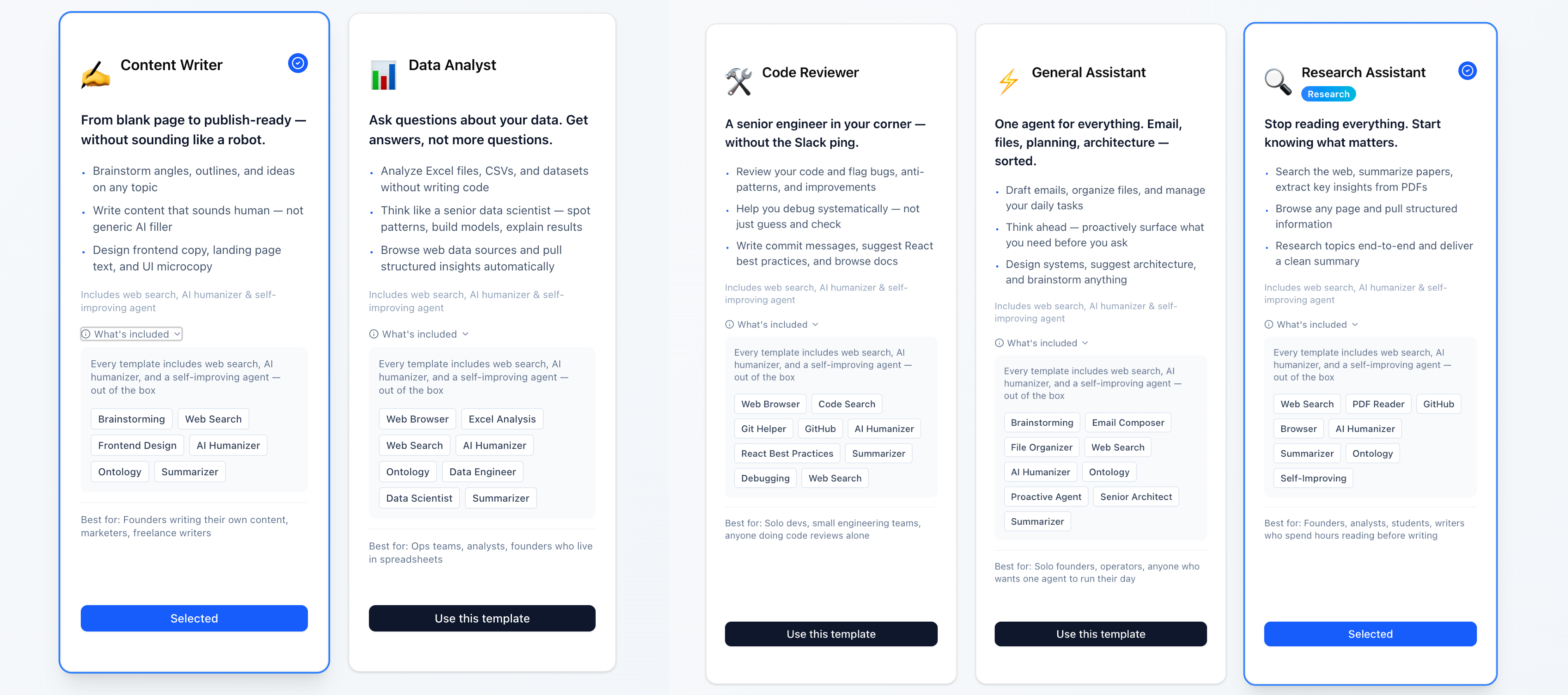
Every agent runs the same base Docker image (openclaw:latest), but each template loads a different set of pre-configured skills from Azure Files at startup. There are five templates to cover the most common workflows: a Research Assistant for deep-dive analysis, a Code Reviewer for PR sessions and debugging, a Content Writer for going from blank page to publish-ready, a Data Analyst for working through spreadsheets and datasets, and a General Assistant for everything else. Every template ships with web search, an AI humanizer, and a self-improving agent out of the box — and all skills are fully customizable, so you can add, remove, or build your own as your workflow evolves.
The Architecture
Frontend: Next.js on Vercel — dashboard, template picker, instance management Auth: Supabase with Google OAuth — user accounts + Row Level Security on the database Backend: FastAPI on Render — orchestrates container lifecycle via Azure Container Apps API Compute: Azure Container Apps — each user gets isolated containers Storage: Azure Files — persistent volume per container (chat history, configs, uploaded files)
Why This Stack
Supabase — Free tier is generous, and I needed auth + Postgres with Row Level Security out of the box. Firebase was an option, but I wanted a relational database, not Firestore's document model.
Render for the backend — Deliberate decoupling. The orchestration layer is separated from the container runtime. If I ever need to switch from Azure Container Apps to GCP Cloud Run or AWS ECS, I swap out the Azure SDK calls in FastAPI. Nothing else changes. This was an intentional architectural decision — keep the backend cloud-agnostic so the platform isn't locked into any single provider.
Vercel for the frontend — Next.js deploys in seconds, free tier handles the traffic. No reason to overcomplicate it.
Azure Container Apps — The core decision. I needed per-user isolated containers with persistent storage, custom subdomain routing, and the ability to start/stop containers on demand. Azure Container Apps checks all three boxes. AWS ECS could work but carries more operational overhead. GCP Cloud Run scales to zero but doesn't support persistent volumes the same way.
How Container Creation Works
When a user clicks "Create Instance":
- Backend validates their LLM API key (OpenAI, Claude, or OpenRouter)
- Calls Azure Container Apps API to provision a new container with the selected template's skill configuration
- Mounts a dedicated Azure Files volume for persistent storage
- Stores container metadata in Supabase (instance ID, status, subdomain, template)
- Updates Azure's ingress rules to assign a custom subdomain (
instance-id.openclaw.ai) - Returns a live URL — ready in under 2 minutes
After the first creation, stopping and resuming is faster — about 30–40 seconds for the UI to load back up.
Container Isolation
Each container is fully isolated. One user's agent can't touch another's. Each gets:
- Its own environment variables (including the user's encrypted LLM API key)
- Its own Azure Files volume (chat history, skill configs, uploaded files)
- Its own subdomain and ingress rules
- Its own skill configuration loaded at startup
Why Containers Over Serverless
Cold starts. Serverless functions spin down after inactivity, and LLM calls already take 2–5 seconds. Stacking a 10-second cold start on top of that is unacceptable UX. Containers stay warm while running.
Execution limits. Some agent tasks — deep research, multi-step analysis, large code reviews — need to run longer than serverless allows. Containers don't have that ceiling.
Stop/Resume. You can't "pause" a Lambda function and resume it with state. With containers + persistent volumes, stopping a container preserves everything on disk. Restart mounts the same volume — full context restored.
Stop, Resume, and Persistent Storage
This is the core UX loop:
- Spin up a container from a template (~2 min first time)
- Do your work — chat, upload files, run analysis, review code
- Pause the container when you're done — compute stops, storage stays
- Resume anytime — same container, same data, same conversation history (~30–40 seconds)
Everything persists in the Azure Files volume mounted to each container:
- Chat and conversation history
- Uploaded documents and files
- Agent configuration and custom skills
- Workspace state
- User preferences and behavioral patterns
When a container is paused, only the compute stops. The storage volume remains intact. Resume remounts the same volume — you're back exactly where you were.
Persistent Storage Enables a Self-Evolving Agent
This is where persistent storage becomes more than just a convenience — it's what makes the agent genuinely useful over time.
Every interaction gets stored. Every preference gets remembered. Every correction teaches the agent something. The result: your agent evolves with you.
- Learns your preferences — If you always want competitive analysis in a specific format, or code reviews focused on security over style, the agent remembers. You tell it once, not every session.
- Learns from mistakes — Corrected the agent's output? That correction is stored. Next time, it adjusts. The more you use it, the fewer corrections you need.
- Customizes itself to your workflow — Over time, the agent builds a profile of how you work. Your Research Assistant starts surfacing the types of sources you actually use. Your Code Reviewer starts flagging the patterns you care about. It's not a static tool — it adapts.
- Custom preferences persist across sessions — Pause for a week, resume, and the agent still knows your tone of voice, your formatting preferences, your domain context. Nothing resets.
This is the difference between a chatbot and a personal agent. A chatbot starts from zero every time. An OpenClaw agent compounds knowledge — each session builds on the last. The persistent storage layer is what makes that possible.
Users can also create their own preference files, upload domain-specific knowledge, or configure custom rules that the agent follows. It's not just machine learning — it's deliberate customization backed by storage that never disappears.
Multi-Channel Access
Once an instance is running, users aren't limited to the web UI. OpenClaw supports multiple channels:
- Web UI — the full OpenClaw interface at
instance-id.openclaw.ai - WhatsApp — connect your instance and interact with your agent from your phone
- Telegram — same agent, different interface
- More channels available within OpenClaw's integration options
This changes the workflow. Spin up a Research Assistant on your laptop, do the initial setup, then continue the conversation from your phone while you're on the go. The container is running either way — channels are just different interfaces to the same agent, the same context, the same persistent storage.
BYOK: Bring Your Own Key
The platform is free. Users bring their own LLM API key.
Supported providers:
- OpenAI — GPT-4, GPT-4o, and other models
- Anthropic Claude — Claude 3.5 Sonnet, Opus, Haiku
- OpenRouter — access to 100+ models through a single API key
Why BYOK: Users pay their LLM provider directly. They set their own spending limits, get their own receipts, and control their own rate limits. No middleman, no markup. This keeps the platform simple, free, and focused entirely on the agent experience — not on becoming a payment processor.
Security: API keys are encrypted at rest in the database and passed as environment variables to isolated containers. The database is protected with Supabase Row Level Security. Each container is isolated — keys are scoped to individual instances, not shared across users.
Customizable for Any Workflow
OpenClaw isn't just the five templates. The architecture is designed so that any workflow can become a template:
- Sales teams — spin up an agent loaded with competitive intel skills, CRM integrations, and email drafting
- Recruiting — an agent that screens resumes, searches LinkedIn, and drafts outreach
- Customer support — an agent trained on your docs that drafts responses and escalates edge cases
- Data pipelines — an agent that monitors data quality, runs SQL, and alerts on anomalies
Each use case is a different skill configuration on the same infrastructure. Same Docker image, same container orchestration, same persistent storage. The only thing that changes is what skills get loaded at startup and how the agent is configured.
If you have a repetitive workflow that involves an LLM, it can probably be an OpenClaw template.
This is OpenClaw Personal AI — a platform I built in 4 weeks and use every day. If you're thinking about how to add task-specific AI agents to your product or workflow without building the infrastructure from scratch, I'd love to talk.
Related Projects
Questions about this project?
Have feedback or want to discuss technical details? Reach out.